
*Get inspired with some*Real Cases**
Manual Redemption Coupon
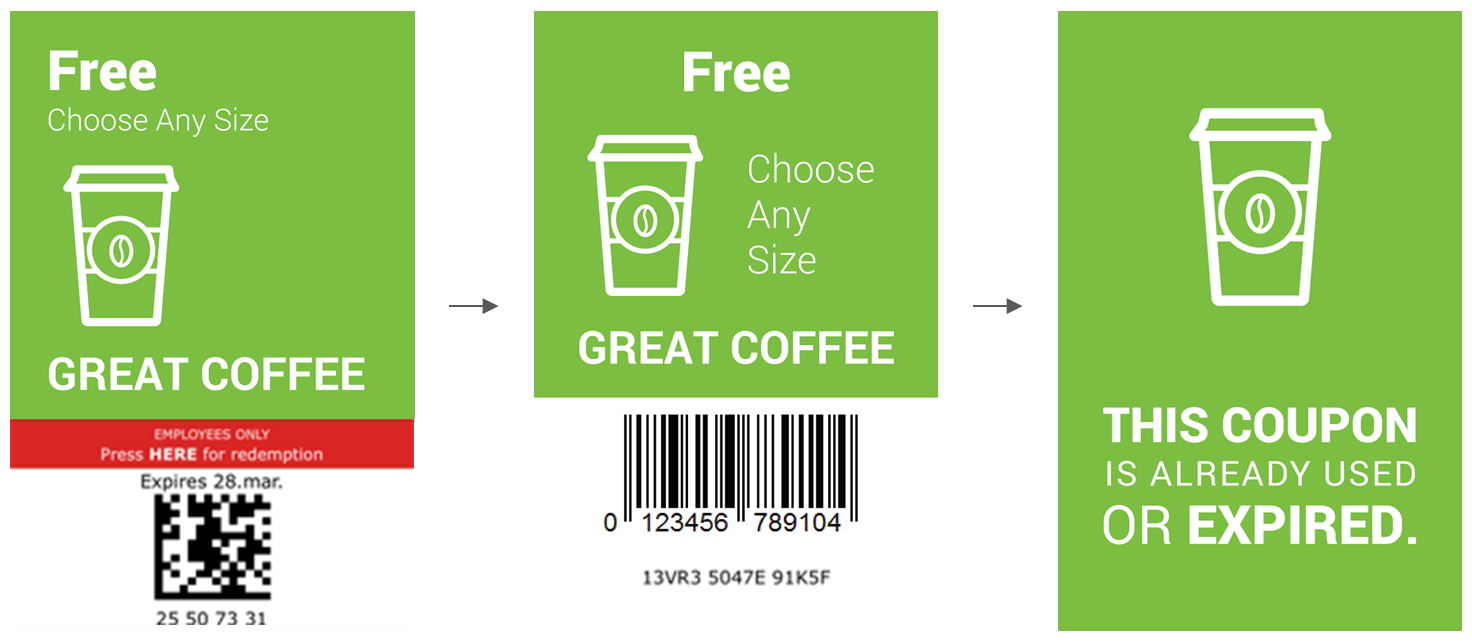
This is an example of manual redemption – Self-val coupon:
RESOURCES
Photoshop file with templates. The fastest way to create graphics.
Folder with example images.
IMAGE LIST AND TIPS
Here is a list of the required images for creating a Manual redemption – Self-val coupon campaign:
| NAME | IMAGE | WIDTH (px) | HEIGHT (px) | REMEMBER! |
| Coupon image | 640 | App: Coupon top image SMS preview: 670 | Coupon before use. Click to redeem coupon. Make sure to clearly communicate: - Product(s) - The offer - Press to redeem. Employees only. | |
| Image shown after successful validation | 640 | 850 | Coupon image after activation. Instructions to the employee, eg.: - Discount trigger / PLU code - Static scannable barcode representing the discount trigger / PLU code - Written instruction Liquid Barcodes adds a verification code below the image. | |
| Image shown on depleted code | 600 | 920 | Expired coupon. Coupon has been used. | |
| Thumb / Preview image | App-specific SMS preview: 640 | App-specific SMS preview: 640 | Optional. Default is coupon image before use. App image sizes are app-specific |
For apps, image sizes are app-specific.