How do I set up push notifications with Liquid Barcodes?
Push notifications can significantly increase app opening rates. Liquid Barcodes supports sending push notifications triggered by specific in-app events, provided the following steps are completed by the app developer or publisher:
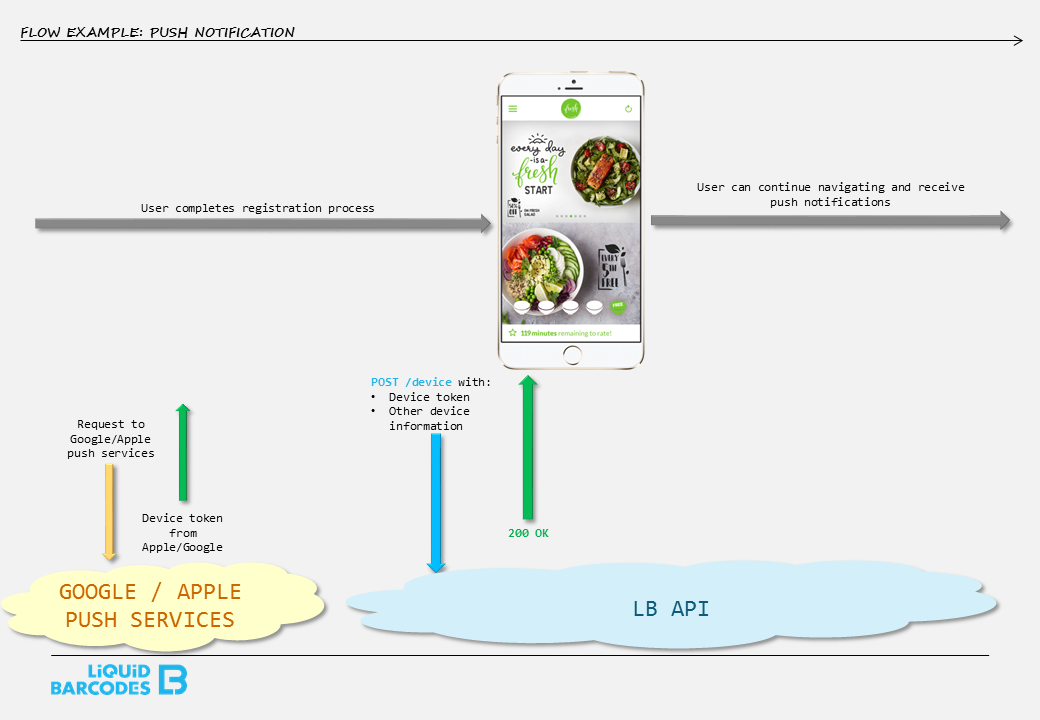
Liquid Barcodes supports sending push notifications depending on certain events to the app provided that the following steps are completed by the app developer/publisher:- On Android and iOS, register the application with the relevant push notification services (Apple Push Notification service for iOS, Firebase Cloud Messaging for Android).
- Forward the required credentials to Liquid Barcodes:
- Apple Push Notification service (APNs): The iOS Push certificate
- Firebase Cloud Messaging (FCM) service: The Server key or credentials file
- Add functionality to register each instance of the application running on customers' devices with the relevant push notification service to obtain a DeviceToken (iOS) or Registration ID (Android).
- Call the
RegisterDevicefunction in either of these situations:- The DeviceToken or Registration ID changes.
- The app completes a successful registration.
- Forward the credentials to Liquid Barcodes. The credentials we require are:
- Apple push notification service: The iOS Push certificate
- Google Cloud Messaging (GCM) service: The API key
- Add functionality to register each instance of the application running on the consumers' devices with the relevant push notification services to obtain the DeviceToken/RegistrationID
- Every time the DeviceToken/RegistrationID changes, AND upon achieving a successful registration, the app must call the RegisterDevice function described below.
When should the app re-register the device?
Re-register the device each time the customer opens the app and the app makes its initial GET /content request. The app does not need to re-register on every subsequent GET /content request — once per day is the recommended maximum frequency. Always test push notification functionality when releasing a new app version to ensure device registration works correctly and no registrations are missed.
Note: Repeat device registration when the customer opens the app and the app does the initial GET /content request. The app does not have to reregister on every GET /content request, once per day is recommended.